See Your Life in Numbers
Turn your location data into meaningful insights. Discover patterns, track achievements, and celebrate milestones with comprehensive statistics updated automatically every hour.
7-day free trial · Cancel anytime
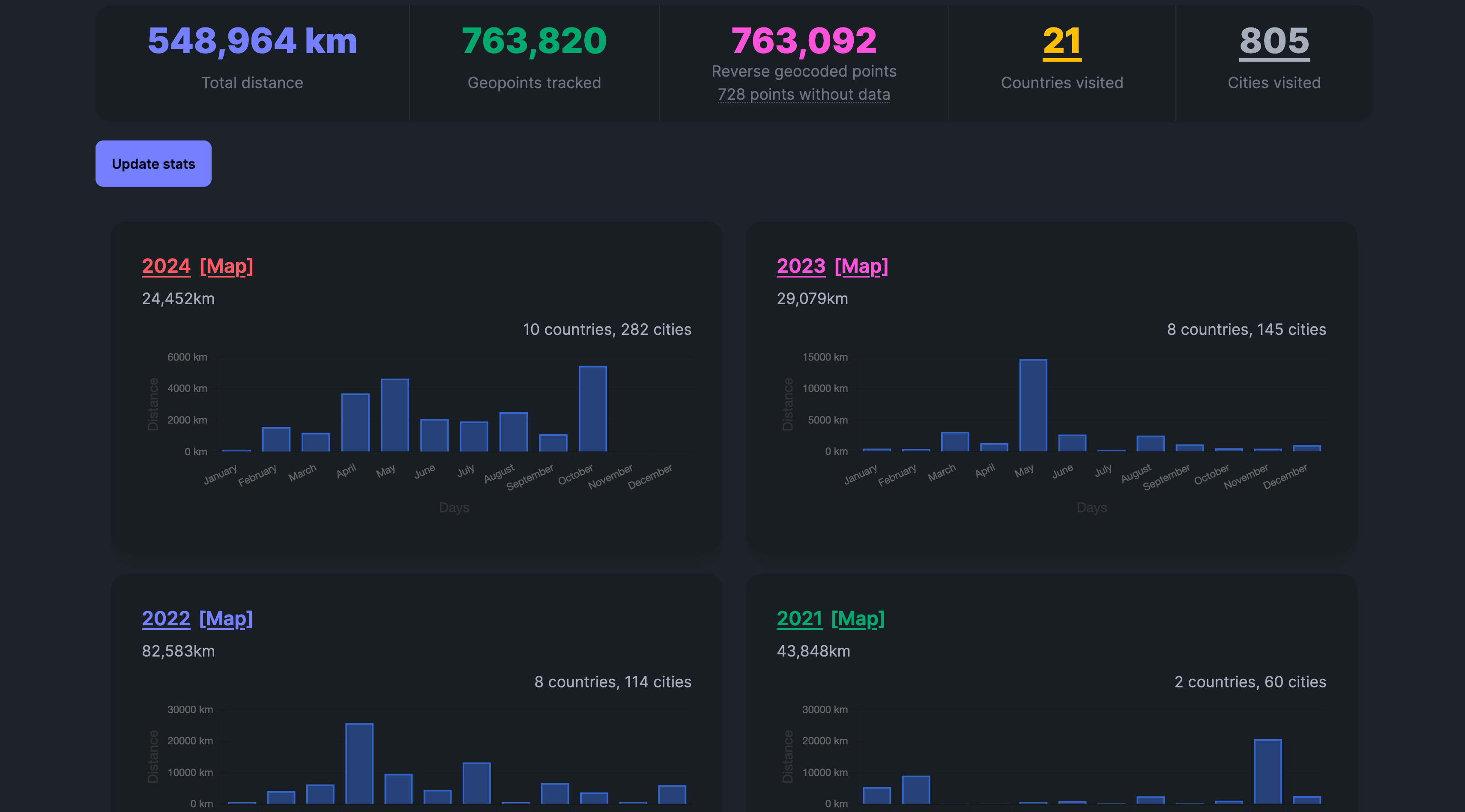
What You Can Track
Global Stats
- Countries visited
- Cities explored
- Total distance traveled
Time-Based Stats
- Yearly summaries
- Monthly breakdowns
- Most active periods
Comprehensive Analytics
Everything you need to understand your location history at a glance.
Monthly & Yearly Insights
Get automatic summaries of your location data broken down by month and year. See trends, patterns, and highlights from each period.
Cities & Countries Visited
Track every country you've been to with automatic counting and visualization. Perfect for travel enthusiasts collecting passport stamps.
Total Distance
Calculate the total distance you've traveled across all your recorded location data. See how far you've gone over time.
Email Digests
Receive automatic monthly and yearly summary emails highlighting your travel achievements and statistics.
How It Works
Your statistics are calculated automatically — no manual work required.
Track Automatically
Your stats are automatically calculated in the background every hour as you track your location.
- No manual input required
- Updates happen automatically
- Historical data processed continuously
View Your Stats
Open the Insights page to see your comprehensive location analytics.
- All Time summary with a card and route map per year
- Pick any year to see its months, calendar and comparisons
- Click on any month to see its statistics and map
Explore on Map
Use the [Map] links to visualize your stats geographically.
- Click [Map] next to any year
- View monthly data on interactive map
- See your complete routes and points
Manual Updates
Force an immediate stats update anytime with the "Update stats" button.
- Click "Update stats" for instant refresh
- Usually completes in a few minutes
- Useful after importing large datasets
Why Stats Matter
Motivation
Seeing your travel achievements in numbers motivates you to explore more and set new goals.
Understanding Habits
Discover patterns in your movement and understand how you spend your time across different locations.
Annual Memory Recap
Get beautiful yearly summaries that help you remember and celebrate your adventures and experiences.
Your countries visited map, built for you
You do not tick countries off a list. Dawarich reads your location history and counts the countries and cities you were in, for your whole history, for each year and for each month.
Click a countries or cities count to see the full list of places, each with a link to that part of the map. Import years of Google Timeline data and your map of visited countries fills in at once.
Years, months and single days
The All Time view shows one card per year, with its distance, a map of its routes, its months and its countries and cities. Pick a year to see distance month by month and a calendar where every day is coloured by the country you were in.
A country timeline shows how many days you spent in each country that year, and a distance race compares this year with the last one. Calendar country colours and the country timeline are part of Pro and self-hosted Dawarich.
Where the countries come from
Countries and cities come from reverse geocoding: turning coordinates into place names. Dawarich Cloud does this for you. A self-hosted instance needs a geocoding service configured; until then, distances and active days still work but countries stay empty.
Share a month
Any month can be shared through a public link that expires after an hour, a day, a week or a month. People you send it to see that month's statistics without an account, and nothing else. On Dawarich Cloud, sharing statistics is part of the Pro plan.
Frequently asked questions
- How does Dawarich know which countries I visited?
- From the points in your location history. Each point is matched to a country and city by reverse geocoding, and each place is counted once per period.
- Can I add the trips I took before using Dawarich?
- Yes. Import your Google Timeline, Google Photos location data, GPX, FIT and other files, and those years appear in your statistics and on your map of visited countries.
- Can I count how many days I spent in each country?
- Yes. The yearly country timeline shows days per country, and the [Tax Residency Day Counter](/tax-residency/) adds stay periods and a 183-day flag.
- How often are the statistics updated?
- In the background after new points or imports arrive, and every hour. You can also recalculate them with Update stats on the Insights page.
- Who can see my statistics?
- Only you, unless you share a month with a public link. Dawarich does not sell or share your location data.
Start Tracking Your Stats
Begin building your location statistics today with a 7-day free trial. Cancel anytime.
7-day free trial · 14-day risk-free refund · Cancel anytime